
Key takeaways:
- Google works in three stages: it crawls a page, indexes it, then serves it in results. Technical SEO keeps each stage open.
- Blocking a page in robots.txt does not keep it out of Google; Google's own docs say to use a noindex tag instead.
- Google rates a page's loading as good when its main content appears within 2.5 seconds.
- Google can only reliably follow links built as standard HTML anchor tags with an href.
- Sites that block OpenAI's OAI-SearchBot will not be shown in ChatGPT search answers, per OpenAI.
Technical SEO sounds like something only developers should care about, yet it decides whether the rest of your marketing gets seen at all. A technical SEO audit is how you find out if your site has a hidden fault: a page Google cannot reach, a setting that tells it to ignore your best content, or a layout that falls apart on a phone.
Most owners only learn about these problems after traffic or calls drop. The site still looks fine in a browser, so nobody suspects the plumbing. This guide explains what technical SEO is in plain words, how Google reads your site, what an audit checks, and a checklist that tells you which items you can handle and which need a developer. It also covers the newer layer: making sure AI search tools can read your pages too.
What is technical SEO, in plain English?
Technical SEO is everything about your website's setup that affects whether search engines can find, load and understand your pages. It is not about what your pages say. It is about whether the machine reading them can get through the door.
A useful way to picture it: your website is a shop. Content is the stock on the shelves, and links from other websites are word of mouth. Technical SEO is the door, the lights and the aisle signs. If the door is locked, the best stock in town sells nothing.
SEO is usually split into three parts, and they depend on each other:
| Part of SEO | What it covers | Plain example | Who usually does it |
|---|---|---|---|
| Technical SEO | Crawling, indexing, speed, mobile, redirects, site structure, security | Making sure Google can open your service pages | A developer or technical specialist |
| On-page SEO | Words, headings, titles and images on each page | Writing a clear title for your "Water Heater Repair" page | A writer or marketer |
| Off-page SEO | Signals from other sites: links, reviews, mentions | A trade association linking to your site | A marketer, plus you |
The three overlap. A title tag is on-page work, but a site where 40 pages share the same title is a technical problem, because it usually comes from a template. That is why audits look at patterns across the whole site, not one page at a time.
How does Google read your website?
Google reads your site in three stages: crawling, indexing and serving. Technical SEO is the work of keeping all three open.
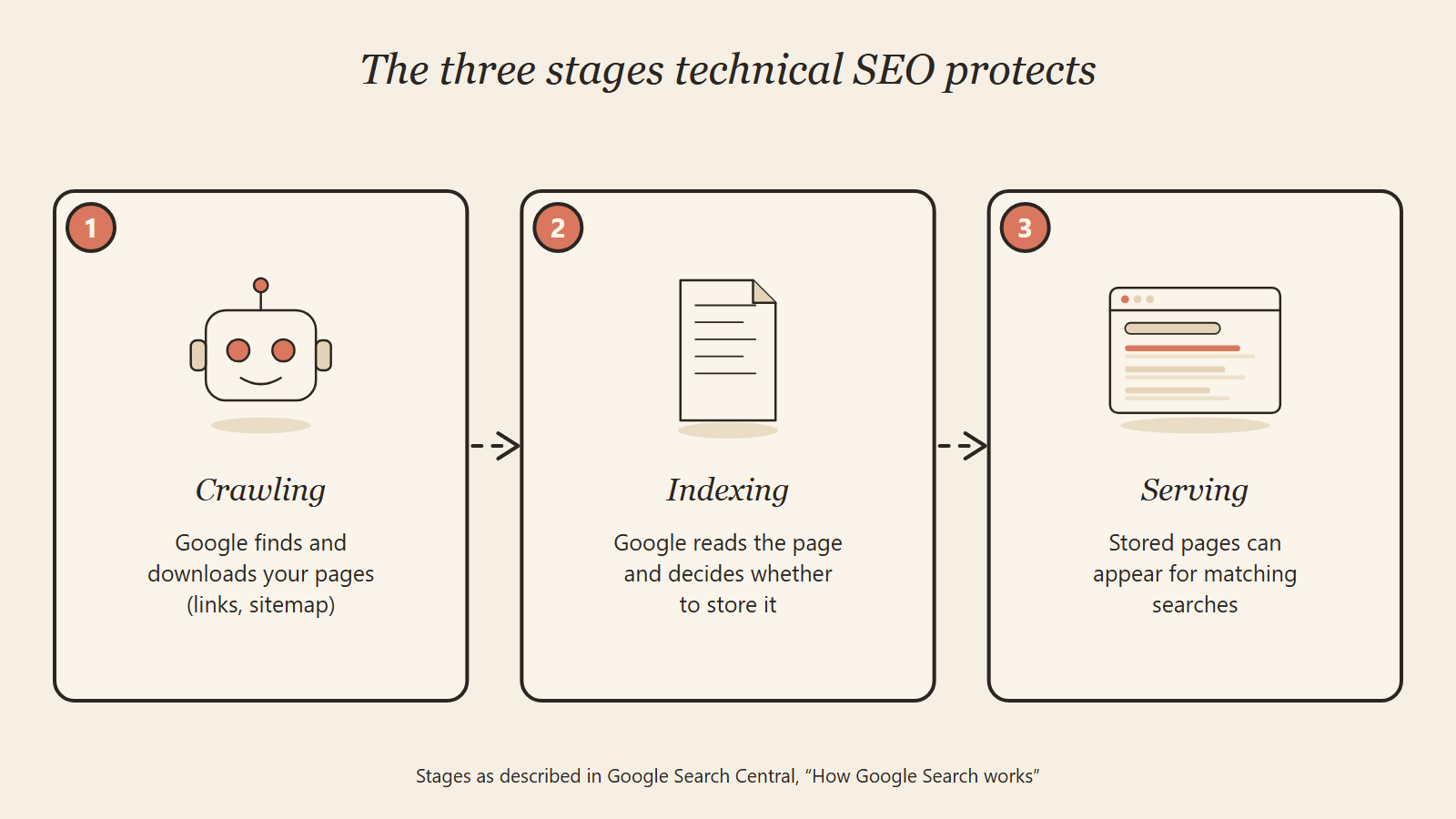
Google Search Central's guide to how Search works lays the stages out plainly:
- Crawling. A program called Googlebot follows links and downloads pages. While it does this, Google renders the page, meaning it runs the JavaScript on it with a recent version of Chrome, much like a visitor's browser.
- Indexing. Google works out what each page is about and stores it. When it finds several near-identical pages, it groups them and picks one, called the canonical, to show in results.
- Serving. When someone searches, Google pulls the most relevant stored pages and ranks them.
Two lines from that same guide are worth knowing before you hire anyone. Google says it does not guarantee that it will crawl, index or serve any page, even one that follows every rule. It also states it does not take payment to crawl a site more often or rank it higher.
So technical SEO cannot force a ranking. What it does is remove the reasons Google might skip, misread or ignore your pages. Ranking still comes down to relevance, content quality and trust.
What does a technical SEO audit check?
A technical SEO audit checks whether each of those three stages works for every important page on your site. Most audits group the checks into six questions.
Can Google get in?
This is about access. The audit reads your robots.txt file, a small text file that tells crawlers which parts of the site they may visit. One wrong line there can block a whole folder of service pages.
It also checks your XML sitemap, the list of pages you hand to search engines. A good sitemap lists every page you want found, and nothing else: no deleted pages, no redirects, no test pages. If the sitemap and the real site disagree, Google gets a wrong map.
Can Google find every page?
Google discovers pages mostly by following links, so the audit maps how your pages connect. It looks for orphan pages (pages nothing links to), pages buried four or more clicks from the homepage, and important pages that get few internal links.
It also checks how those links are built. Google's link guidance says it can only reliably crawl a link built as a standard <a> HTML element with an href address. A "card" or button that opens a page through a script may work for a visitor and still be a dead end for Google.
Does Google see what visitors see?
Many modern sites load part of their content with JavaScript after the page opens. Google can run JavaScript, but anything that only appears after a scroll, a click or an animation may not be in the version Google stores. The audit compares the raw page source, the rendered page and what a visitor sees, and flags any gap.
Is the right version indexed?
Here the audit checks which pages are in Google's index and which are being left out on purpose or by mistake. A noindex tag tells Google not to store a page, and it is easy to leave one switched on after a redesign.
It also checks canonical tags, which tell Google which version of a page is the original. Duplicate versions are common on small sites: http and https, with and without www, or the same product reachable at three addresses. If the signals disagree, Google picks a version itself, and it may not pick the one you want.
Do old addresses still work?
Every page returns a status code. A 200 means the page loaded, a 301 means it has moved permanently, and a 404 means it was not found. The audit lists every broken link and every 404 that still gets visits or links from other sites.
It also checks redirects. A chain (page A sends you to B, which sends you to C) slows things down and wastes Google's visits. Worse is a redirect that sends a useful old page to an unrelated one, such as a guide redirected to a sales page, because Google may treat the original content as gone.
Is it fast, secure and mobile-ready?
Google uses the mobile version of your site for indexing, so the audit checks pages on a phone first. It also confirms every page loads over HTTPS without warnings.
Speed is measured with Core Web Vitals, which come from real visitors' devices. Per Google's Core Web Vitals guidance, the targets for a good experience are:
| Core Web Vital | What it measures | Good score |
|---|---|---|
| Largest Contentful Paint (LCP) | How fast the main content appears | Within 2.5 seconds |
| Interaction to Next Paint (INP) | How fast the page reacts to a tap or click | Under 200 milliseconds |
| Cumulative Layout Shift (CLS) | How much the layout jumps while loading | Under 0.1 |
Some older guides still list First Input Delay. Google has replaced it with INP, so treat any checklist that mentions FID as out of date.
Can machines read the facts?
The last check covers structured data, also called schema markup. It is code that states facts about a page in a fixed format: your business name, hours, prices, reviews or FAQ. The audit validates it, because broken or false markup can feed search engines the wrong details. Our guide to schema markup for AI search covers which types matter most.
What do real technical problems look like?
Real technical problems rarely look dramatic. The site loads, the pages look right, and the fault only shows when you read the site the way a crawler does. Here are four we found on small business sites (anonymous, numbers exact):
- Every blog post pointed somewhere else. On a solar installer's rebuilt site, each blog post carried a canonical tag naming the blog list as the original page. In effect, the site was asking Google to ignore its own articles.
- Links that were really buttons. A tree service had 44 posts readers could open, but the blog cards were coded as buttons. Google had no link to follow, so the posts sat outside its reach.
- Ratings that loaded too late. An auto repair shop showed 369 reviews at 4.7 stars, but an animated counter filled in those numbers only after the page ran in a browser. On 30 of its 58 pages, what Google stored was a 0.0 rating from 0 reviews.
- A stale page list. A national services company's server kept handing out an old sitemap: 32 pages instead of 53. Three of its four main pages had never been crawled.
None of these needed new content. They needed the plumbing fixed. After the tree service's links were rebuilt and its old addresses repaired, its average Google position moved from 33.0 to 12.5, comparing the 28 days before our work with the latest 28 days. At the auto repair shop, phone calls from Google search went from 3 to 25 a month after the review data and the site's other fixes went live.
How do you run a technical SEO audit?
You can run a basic technical SEO audit with free tools in an afternoon. The value is in reading the results in order, because one root cause often creates dozens of warnings.
- Start in Google Search Console. The Pages report shows which pages are indexed and why others are not. The Core Web Vitals and HTTPS reports cover speed and security. If you have not set it up, do that first; it is free.
- Crawl the site. A desktop crawler (Screaming Frog's free version handles up to 500 addresses) lists status codes, redirects, duplicate titles, missing canonicals and pages blocked by robots.txt or noindex.
- Compare the sitemap with the crawl. Pages in the sitemap that the crawler cannot reach, or live pages missing from the sitemap, point to a structure problem.
- Test key templates for speed and mobile. Run your homepage, one service page, one blog post and your contact page through PageSpeed Insights. Fix by template, since one slow template can slow hundreds of pages.
- Check what Google actually stored. Use the URL Inspection tool in Search Console on your most important pages and view the rendered HTML. On larger sites, server log files show which pages Googlebot visits and how often, which is the most direct proof of what it sees.
- Rank the fixes. Sort every issue by how many money pages it touches and how badly. A blocked service page beats 300 missing image descriptions every time.
- Fix, then re-check. After changes go live, request indexing for the key pages and watch the Pages report over the next few weeks.
If you want the full picture beyond the technical layer, our guide to what an SEO audit includes covers content, links, local presence and the report you should get. For owners doing the work themselves, our DIY SEO guide shows where technical fixes fit in a weekly routine.
Technical SEO checklist: what can you fix yourself?
Many technical fixes take a settings change, not a developer. Others sit in your site's code or server, and a wrong change there can make things worse. This technical SEO checklist shows who should own each item and how urgent it is when it fails.
| Check | What "good" looks like | Who fixes it | Urgency if it fails |
|---|---|---|---|
| Search Console set up and verified | You can see the Pages report | You | High |
| Key pages indexed | Service and contact pages show as indexed | You check, developer fixes the cause | High |
| No stray noindex tags | Only private pages carry noindex | Developer, or you in a CMS plugin | High |
| robots.txt allows key folders | No "Disallow" on pages you want found | Developer | High |
| XML sitemap accurate | Lists only live, indexable pages | Developer or SEO plugin | Medium |
| One site version | http and non-www all redirect to one https address | Developer or host | High |
| Canonical tags | Each page names itself, or the true original | Developer | High |
| Links are real links | Menus, cards and buttons use standard links | Developer | High |
| No important 404s | Old pages with visits or links redirect to the closest match | You in a redirect plugin, or developer | Medium |
| No redirect chains | One hop from old address to new | Developer | Low to medium |
| Mobile layout | Text readable, buttons tappable on a phone | Developer or theme settings | High |
| Core Web Vitals | LCP, INP and CLS in the good range | Developer | Medium |
| Images sized and compressed | No giant photos slowing pages | You | Medium |
| Structured data valid | No errors in Google's Rich Results Test | Developer or SEO specialist | Medium |
| AI crawlers allowed | robots.txt and firewall do not block search bots | Developer or host | Medium |
Start with every "High" row. Those are the faults that can hide whole pages, while the "Low" rows mostly trim waste. If your site needs a rebuild to fix the high rows, our AI website development team builds sites with these settings correct from day one.
Does technical SEO matter for AI search?
Yes, and arguably more than before. AI answer tools can only quote pages they can reach, and most of them rely on the same crawl-and-index basics as Google.
For Google's own AI features, the rule is simple: a page has to be indexed and eligible to show in normal results first. So every check above also protects your chances of appearing in AI Overviews and AI Mode.
Other assistants send their own crawlers. OpenAI's crawler documentation says sites that opt out of OAI-SearchBot will not be shown in ChatGPT search answers. It treats GPTBot, which gathers training data, as a separate setting, so you can allow search visibility while blocking training. OpenAI also notes it can take about 24 hours for a robots.txt change to reach its search systems.
The trap is that these bots are often blocked by accident. Security plugins, CDN bot settings and copied robots.txt templates can all shut them out without anyone noticing. A 2026 technical SEO audit should check your robots.txt and firewall rules for each major AI crawler, then confirm what the tools actually say about your business. Our ChatGPT citation playbook picks up from there, and our AI SEO services cover both layers together.
Which technical SEO myths waste your money?
The costliest myths come from half-true advice repeated online. Google's own documentation settles most of them.
"Blocking a page in robots.txt hides it from Google"
It does not. Google's robots.txt introduction states that robots.txt is not a way to keep a page out of Google, and a blocked page can still be indexed if other sites link to it. To keep a page out of results, use a noindex tag or put it behind a password.
"A perfect speed score will push you to the top"
It will not on its own. Google's page experience guidance says good Core Web Vitals do not guarantee top rankings, and that Google will show the most relevant page even when its experience is weaker. Speed fixes are worth doing, but chasing a 100 score on a page with thin content is money spent in the wrong place.
"You can pay to get crawled faster"
No one can sell you this. Google's guide to how Search works says plainly that it does not accept payment to crawl a site more often or rank it higher. Anyone offering paid "priority indexing" is selling something Google does not offer.
"Technical SEO is a one-time job"
Sites change. A plugin update, a new page template or a redesign can undo months of careful setup overnight. Treat technical health as something you check on a schedule, not a box you tick once.
Frequently Asked Questions
What is the difference between technical SEO and on-page SEO?
Technical SEO covers whether search engines can reach and store your pages: crawling, indexing, speed, mobile and site structure. On-page SEO covers what each page says and how it is labeled, such as titles, headings and copy. You need both, but technical problems come first because they can stop good content from being seen.
How much does a technical SEO audit cost?
It depends on site size and depth, from a free self-check to several thousand dollars for a large site. As a broad market benchmark, an Ahrefs survey of 439 SEO providers found $2,501 to $5,000 was the most popular one-off project fee, though that covers all SEO projects, not audits alone. SpeedX starts with a free AI SEO audit and quotes a fixed scope for any fixes afterward.
How long does a technical SEO audit take?
A small business site can get a solid technical review in a few days, and a larger store or a site with thousands of pages can take a few weeks. Results from the fixes take longer, since Google has to re-crawl the pages. Our post on how long SEO takes covers realistic timelines.
How often should you do a technical SEO audit?
Once or twice a year suits most small business sites. Run one straight away after a redesign, a platform move, a domain change or any sudden drop in traffic, because those are the moments technical faults appear.
Do I need a technical SEO audit before a website redesign?
Yes. Audit before the redesign so you have a list of every page, its traffic and the links pointing to it, then check again right after launch. Most traffic lost in a redesign comes from missing redirects and leftover noindex tags, both of which a before-and-after check catches.
Can I do technical SEO without a developer?
You can handle a good share of it: setting up Search Console, compressing images, fixing redirects in a plugin and checking which pages are indexed. Changes to templates, server settings, JavaScript and site speed usually need a developer. The checklist table above marks which is which.
Get a free technical and AI SEO check
If your site looks fine but traffic, calls or AI mentions are flat, a technical fault is a likely suspect. We will run a free AI SEO audit that checks crawling, indexing, speed and AI crawler access, and send you a short list of the fixes that matter most, with who should make each one.
WhatsApp our team, email info@speedxmarketing.com, or use our contact page. You keep the findings whether or not you work with us.
SpeedX Marketing