Key takeaways:
- Adding or claiming a Business Profile costs nothing, and Google says nobody can pay for a better local ranking.
- Your business needs in-person contact with customers during its stated hours; online-only businesses can't get a profile.
- Google chooses your verification options based on business type, public info, region and hours, and you can't change them.
- Video verification needs a live, unedited recording of at least 30 seconds, made from your phone inside the profile.
- If your profile gets suspended, appeal it. Google warns against creating a new profile for the same business.
Google Business Profile verification is the step that proves to Google you really run the business on the listing. Until you pass it, you can't fully control your hours, photos, reviews or the details shown in Maps. Most owners who get stuck aren't doing anything wrong; they just didn't know what Google would ask for.
This guide walks through setup and verification in order: who qualifies, how to create or claim a profile, which method you'll likely see, what to film or prepare, how long it takes, and what to do when it fails. Every rule below comes from Google's own Business Profile Help Center, linked at each step so you can check it yourself.
Is a Google Business Profile free?
Yes. Google's help page on adding or claiming a Business Profile states plainly that adding or claiming a business is free. There is no subscription, no setup fee and no paid tier for the profile itself.
Two things are worth knowing here. First, Google's page on improving your local ranking says there is no way to request or pay for a better local ranking. Ads are a separate product with separate placements. Second, because the profile is free, anyone who calls claiming you must pay to "verify" or "keep" your listing is not Google. Google's verification page also says it will never ask for your postcard code, and you shouldn't share it with anyone, even people who manage the profile.
Who can get a Google Business Profile?
You qualify if your business makes in-person contact with customers during its stated hours. That covers shops and offices customers visit, plus service businesses like plumbers or cleaners who travel to customers. Google's eligibility guidelines spell out who can't get one:
- Online-only businesses, brands and artists without a place customers visit or a service they deliver in person
- Rental or for-sale properties such as vacation homes or vacant apartments (the leasing office itself can qualify)
- Lead generation companies
- Classes or meetings held at a location you don't own or represent
- Businesses whose address is a P.O. box or a remote mailbox
Google's guidelines for representing your business add that virtual offices aren't eligible either. A co-working desk only qualifies if it has clear signage, receives customers during your hours, and your staff are there during those hours. If you're unsure, settle this first: an ineligible profile is the most common route to a suspension later.
Before you start: which Google account should own the profile?
Use a Google account the business controls, not a staff member's personal Gmail and not an account your web designer or agency created for you. Google's verification page notes you can use any email address for the account, including a work address on your own domain.
This matters more than it sounds. When an employee leaves or a vendor relationship ends, a profile owned by their account becomes a recovery project. Once verified, the business owner can add owners and managers, so an agency or employee can work on the profile as a manager while ownership stays with you.
Get these details ready before you sign in:
- Your exact business name as it appears on your signage, website and invoices (no added keywords or slogans)
- The address customers visit, or the areas you serve if you go to them
- A phone number the business directly controls
- Your website, if you have one
- Your main business category, picked as narrowly as possible
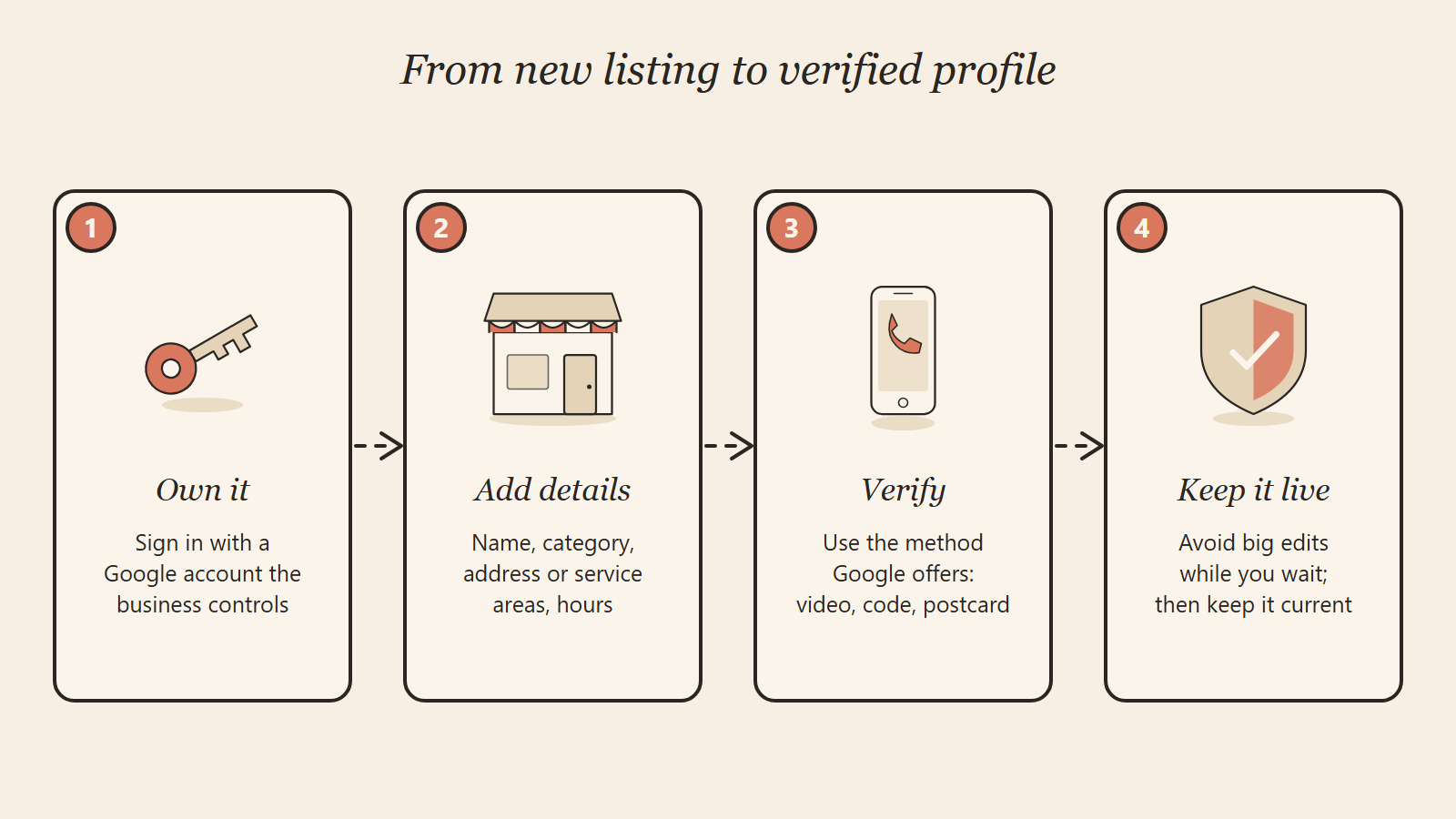
How do you set up a Google Business Profile?
How you start depends on whether a listing for your business already exists. Search your business name and city in Google Maps first. You'll land in one of three situations.
If your business isn't on Google yet
- Go to business.google.com/add and select "Add your business to Google."
- Follow the on-screen steps for your name, category, location and contact details.
- Choose a verification option and complete it (covered in the next section).
Google's setup page asks you to make sure your address is correct and follows its address guidelines before you continue.
If a listing exists but nobody has claimed it
On desktop, open Google Maps, search for the business name and city, select it, then select "Claim this business" and "Manage now." In the Google Maps app, open the listing, tap "About," then "Claim this business" and "Manage now." From there you choose a verification option, same as a new profile.
If someone else already verified it
This happens with former employees, past marketing vendors, or a previous owner. Go to business.google.com/add, enter your business name and address, choose your business, and select "Request access" when Google says someone else may manage it. Per Google's request ownership page, the current owner gets an email and has 3 days to respond. If they don't, you may be able to claim it from the link in your confirmation email, though Google notes that option isn't always available.
If you visit customers instead of them visiting you
Service-area businesses should hide their address and list the areas they serve. Google's service area help page allows up to 20 service areas by city, postal code or similar, and says the overall area shouldn't stretch beyond about 2 hours of driving from your base. You can't set a radius. Hybrid businesses that also serve customers at their address can show both.
Which verification method will Google give you?
Google decides which methods appear, and you can't switch them. According to Google's verification help page, the options depend on your business type, public information, region and business hours, and you may need more than one method. Here's what each one asks of you.
| Method | How it works | What to prepare | Watch out for |
|---|---|---|---|
| Video recording | You film a live clip in the app; Google reviews it | Signage, street context, proof you run the place | Must be live, unedited, at least 30 seconds |
| Phone or text | A code arrives by call or SMS | A phone at the number on your profile | Automated phone menus (IVR) can't receive the code |
| A message arrives at an address shown on screen | Access to that inbox | Follow the steps in the email itself | |
| Live video call | You chat with a Google rep, then show your business on camera | Be at the business during listed hours | Not offered to every business |
| Postcard | A code is mailed to your business address | A correct mailing address | Most arrive within 14 days; codes expire after 30 days |
| Instant | Granted automatically for eligible accounts | Your website verified in Google Search Console | Only some businesses qualify |
| Bulk | Spreadsheet review for chains | 10 or more locations of the same business | Service-area businesses and multi-client agency accounts are excluded |
To start any method, open your profile at business.google.com, select "Get verified," and pick from the options shown.
Postcard rules that trip people up
If you get a postcard, don't edit your business name, address or category while you wait, or the code won't work. Don't request a new code either: that cancels the one in the mail. When it arrives, enter it in the "Code" field on your profile and select "Submit."
Instant and bulk verification
Google says verification can be instant if you've already verified your website in Search Console, so it's worth doing that first if your site isn't connected yet. Chains with 10 or more locations can apply for bulk verification; duplicate or suspended profiles don't count toward the 10, and service-area businesses can't use it.
How do you pass video verification on the first try?
Plan your clip before you press record, because it has to be one continuous take. Google's video verification page requires a live recording made from your phone through your Business Profile, at least 30 seconds long, with no breaks or edits. Keep bank, tax and ID numbers, and other people's faces, out of the frame.
Every video has to prove three things: where you are, that the business exists, and that you manage it. What counts as proof differs by business type.
| What to prove | Storefront or hybrid business | Service-area business |
|---|---|---|
| Location | Street signs, building number, or neighboring businesses | Street signs or landmarks near your base (home-based owners can film the neighborhood) |
| The business exists | Your storefront or permanent sign, with a name matching your profile | Tools, equipment, products, business cards or branded clothing |
| You manage it | Staff-only areas: cash register, kitchen, storage, point-of-sale system | Doing the work or unlocking a branded vehicle; a permit, invoice or utility bill matching your profile name |
A simple script that works: start on the street sign, pan to your building or vehicle, show the name, then walk into a staff-only space or open your equipment. Review it before you tap "Upload video," and re-record if anything is blurry. Google notes that if you have no permanent signage at your location, you should list as a service-area business instead.
How long does Google Business Profile verification take?
Most verifications are reviewed within 5 business days, occasionally longer. That figure comes from Google's own verification page and applies after you finish the steps, so add mailing time if you're waiting on a postcard.
- Phone, text or email: you enter the code or follow the email steps, then Google reviews.
- Video recording: up to 5 business days of review after upload.
- Postcard: most arrive within 14 days, then you enter the code.
- Search Console or bulk: can be instant for eligible accounts.
You'll get a confirmation email when it's done. Service-area changes can take up to 48 hours to appear after approval.
What if Google Business Profile verification fails?
Read the message on your profile; it tells you what Google needs next. Then work through the matching fix below rather than starting over.
| What you see | What it means | What to do |
|---|---|---|
| "Get verified" shows again | Google couldn't fully verify you | Try again, or pick a different method if one is offered |
| "Review issues" after a video | Your video was rejected | Open "Review issues," then re-record everything from the first video plus what was missing |
| A request for more info after editing | Changes to your details triggered a fresh check | Select "Get verified" and verify again |
| Profile suspended or disabled | Google believes a guideline was broken | File an appeal; do not create a new profile |
Google's video page lists common rejection reasons: the business name isn't visible on the storefront, no surrounding area is shown, or there's no proof you're authorized to operate. Edits to your name, address or category are the usual trigger for re-verification, so make those changes carefully once you're live.
If your profile is suspended, Google's suspension help page says to use the appeals tool and explicitly warns against creating a new profile for the same business. It suggests evidence like a business registration, license, tax certificate or utility bill, with a name and address that match the profile. Appeals can only be submitted once, so gather everything first. If none of this works, Google Business Profile support and the help community are the next stop.
What should you do right after you're verified?
Finish the profile, because a verified but half-empty listing does little. Google's local ranking tips say businesses with complete, accurate information are more likely to show for relevant searches, and that local results come down to relevance, distance and prominence.
- Add regular hours and set special hours before holidays.
- Upload real photos of your work, team and location.
- Add attributes and services that apply to you.
- Reply to reviews, good and bad.
- Make sure your name, address and phone match your website exactly.
That last point carries into AI search too. In our experience, AI assistants and Google's AI answers are more confident about a business when its details match everywhere they look. Our guide to schema markup for AI search shows how to mirror your profile details in your site's code, and the ChatGPT citation playbook covers the rest of that picture. Once your profile is live, you can also track how AI tools describe your business. If missed calls are the bigger problem after your listing starts working, see how voice agents handle calls for home services.
Frequently Asked Questions
Can I verify a Google Business Profile without a physical storefront?
Yes, if you serve customers in person at their location. Set yourself up as a service-area business, hide your address, and use video verification to show your tools, branded vehicle or a permit. Online-only businesses can't be verified at all.
Why can't I choose postcard verification?
Google decides which methods you're offered based on your business type, public information, region and hours. You can't request a specific method. If postcard isn't listed, use one of the methods that is.
Can I verify my Google Business Profile with a home address?
Yes. A home-based business can use its home address for verification and then hide it from the public if customers don't visit. Google's video rules let home-based owners film nearby landmarks instead of a storefront.
Do I have to verify again if I change my business details?
Sometimes. Edits to key details like your name, address or category can trigger a new verification request. If that happens, select "Get verified" on your profile and complete the method shown.
Can an agency verify my Google Business Profile for me?
Only business owners or authorized representatives may verify a business, so it's best done from an account the business owns. After verifying, add your agency as a manager. That keeps you in control if the relationship ends.
What if Google says my profile is already managed by someone else?
Use the "Request access" option. The current owner has 3 days to respond, and if they don't, Google may let you claim the profile through your confirmation email.
Want help getting your profile verified and found?
If verification keeps bouncing back, or your profile is live but nobody finds it, start with a free AI SEO audit. We'll check your Google Business Profile, your website details and how AI tools currently describe you, then show you what to fix first. Our AI SEO services cover the work if you'd rather hand it off.
WhatsApp our team, email info@speedxmarketing.com, or use our contact page to get your free audit from SpeedX Marketing.