
Key takeaways:
- Google allows one Business Profile per real location, and all branches of a chain should use the same business name.
- Bulk verification opens up at 10 or more profiles, but service-area businesses can't use it.
- Location pages should live in subfolders on one domain, like /locations/denver/, linked from a crawlable locations hub.
- Google's spam policy names city pages that funnel visitors to one page as doorway abuse.
- Track calls, direction requests and rankings per branch, not just one sitewide total.
Local SEO for multiple locations is a different job from ranking a single shop. When you run two, five or fifty branches, each one fights its own neighborhood competitors in Google Maps, and a win in one town does nothing for the location across the state. The usual approach, one website with a single address in the footer and a few copied city pages, leaves most branches invisible.
This guide walks through the setup in the order we'd do it for a client: profiles first, then site structure, then location pages, then listings, reviews and links, then tracking. You'll also see Google's own rules quoted where they matter, because guessing on these is how multi-location businesses lose profiles or get pages filtered out. If you're still getting your first location right, start with the basics and come back here when you add a second.
What is local SEO for multiple locations?
It's the work of making each physical branch, or each service-area office, show up for searches near it. The goal isn't one strong brand page; it's a strong result in every market you actually serve.
Why one campaign underperforms across branches
Google's local results lean on three factors. Its guide to local ranking names them as relevance, distance and prominence, and describes distance as "how far each business is from the customer who's searching." Distance alone means your Austin branch can't rank in San Antonio no matter how good the website is.
Each branch also has a different set of rivals. One location might face two competitors with thin profiles, while another faces a dozen with hundreds of reviews. A single plan that treats them the same will overspend where it's easy and underdeliver where it's hard.
How it differs from single-location local SEO
| Area | One location | Multiple locations |
|---|---|---|
| Business Profiles | One profile to verify and maintain | One per branch, plus access control for managers |
| Website | Address in the footer, a contact page | A locations hub plus one unique page per branch |
| Listings and citations | One set of details to keep consistent | Every branch's details across every directory |
| Reviews | One review stream | Separate review streams that need balancing |
| Risk | Thin content | Duplicate pages, profiles merging, branches competing |
| Reporting | One dashboard | Results split by branch so weak locations show up |
The jump in workload is mostly about consistency. With ten branches and ten directories, you're checking a hundred listings, and one wrong phone number can send calls to a closed office.
How should you set up Google Business Profiles for each location?
Create one verified profile for each real location that serves customers in person, and keep the name identical across all of them. Your Business Profile drives the map results, so this step matters more than anything you do on the website.
Google's rules for multi-location profiles
Google's Business Profile guidelines are specific, and breaking them is the fastest way to get a profile suspended:
- One profile per location. The guidelines say not to create more than one page for each location, "either in a single account or multiple accounts."
- Same name for every branch. For chains, "all locations must have the same name" unless the real-world signage consistently differs.
- No location in the name. Adding a city or neighborhood to the business name counts as unnecessary information. "Acme Dental Denver" is not allowed if your sign says "Acme Dental."
- No virtual offices or mailboxes. Remote mailboxes and P.O. boxes aren't acceptable, and a virtual office isn't eligible for a profile.
- Departments can be separate. Public-facing departments that operate as distinct entities, such as a dealership's service center, can have their own profile.
These rules exist because people used to spin up fake branches to cover more of the map. Google now looks hard at new profiles in the same account, so a clean record on your real locations protects the whole group.
Storefront branches vs service-area offices
If customers visit you, show the address. If you travel to customers, like a plumbing or cleaning company, the guidelines say a service-area business should hide its address and set a service area instead. Many multi-location home service companies run a mix: a showroom in one city and dispatch offices elsewhere.
What you can't do is open a profile for every town you drive to. Each profile needs a real, staffed office behind it. If you serve 30 towns from three offices, you get three profiles, and the website does the job of covering the other 27.
Verifying 10 or more locations at once
Google offers bulk verification once an account manages 10 or more profiles for the same business. You upload a spreadsheet of all locations, Google reviews the account, and you get an email when it's approved. Two catches: service-area businesses aren't eligible, and agencies with more than one business in one account can't bulk verify.
Under 10 locations, each branch verifies on its own, usually by video or a code. Plan for this before a grand opening, because an unverified profile won't show up in Maps on day one. Our guide to verifying a Google Business Profile covers each method.
Fill out each profile as its own business
A copied profile is a weak profile. For each branch, set its own hours (including holidays), its own local phone number, the services that branch actually offers, and real photos of that building and team. Pick the primary category carefully, then add secondary categories only where that location truly offers the service.
How should you structure the website for many locations?
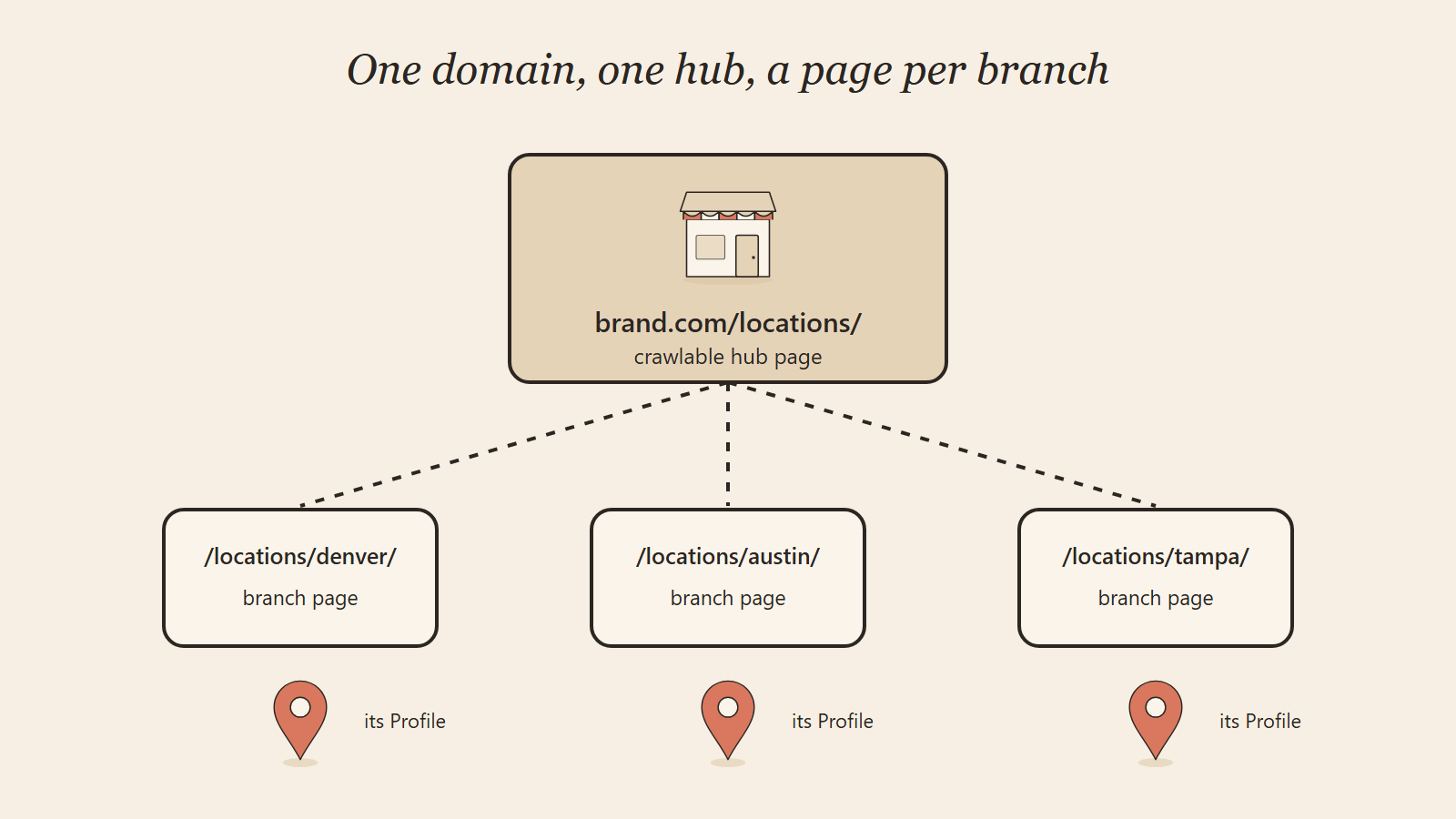
Use one domain with a subfolder per location, such as yoursite.com/locations/denver/, and link every location from a single hub page. That way each branch page inherits the authority your main site has already built, instead of starting from zero.
Subfolders vs subdomains vs separate domains
| Setup | Example | Best for | Downside |
|---|---|---|---|
| Subfolders (recommended) | brand.com/locations/denver/ | Almost every multi-location business | Needs a good template to stay unique |
| Subdomains | denver.brand.com | Franchises where each owner runs a very different site | Often treated like separate sites, so authority is split |
| Separate domains | denverbrand.com | Branches that operate under different brand names | Every site needs its own links and upkeep |
| One page listing all addresses | brand.com/contact/ | Nothing, past one location | No page can rank for any one town |
Subfolders win for most businesses because links earned by the main site help every branch page. Separate domains only make sense when the locations really are separate brands.
Build a crawlable locations hub
Your hub page, usually /locations/, should list every branch with a plain text link to its page. Group by state or region once you pass a dozen or so. This page is how Google finds new branches fast, and how customers jump to the right one.
Many store locator tools load results only after someone types a ZIP code. Google can't type, so those branch pages may never get found. If you use a locator widget, keep a plain list of links on the page too, and add every location page to your XML sitemap.
Link each page to the right profile
Each Business Profile should point its website link to that branch's location page, not the homepage. That ties the profile and the page together and sends map clicks straight to the local details people wanted.
What goes on a location page that actually ranks?
A location page that ranks answers what a local customer needs before calling: where you are, when you're open, what this branch offers, and proof that real people use it. If the page would read the same with a different city name, it isn't finished.
The must-haves for every branch page
- The branch's name, full address and local phone number, matching its Business Profile exactly
- Opening hours, including holiday changes
- An embedded map and plain directions or parking notes
- The services offered at this branch, linked to your main service pages
- Photos of the actual building, staff and work done in that area
- Reviews or testimonials from customers of that branch
- The team or manager at that location
- A clear way to call, book or get a quote from that branch
Local details that make a page different
This is where most location pages fall short. Add what only that branch can say: the neighborhoods it covers, local rules that affect the work, the type of housing or businesses common nearby, seasonal demand in that area, and a short FAQ built from questions that branch's staff actually hear.
Real local detail isn't padding. A roofer's Phoenix page should talk about heat and tile roofs; its Minneapolis page should talk about ice dams and snow load. Those are different answers for different people, and Google can tell.
Add LocalBusiness schema to each page
Schema markup is code that tells search engines and AI tools the facts about each branch in a format they read directly. Google's LocalBusiness structured data documentation says to define each location as its own LocalBusiness, with the required name and address plus recommended details like hours, phone number with country code, coordinates, and the URL of that specific location.
Put each branch's markup on its own page rather than listing every branch on the homepage. Google's same guide reserves review and rating markup for sites that collect reviews about other businesses, so don't add star ratings for your own branches. For a deeper look at what to mark up, see our guide to schema markup for AI search.
How do you keep location pages from looking like duplicates?
Write each page around facts unique to that branch, and make sure every page leads somewhere useful rather than funneling people to one central page. Pages that differ only by city name risk being filtered out or treated as spam.
What Google calls doorway pages
Google's spam policies describe doorway abuse as pages "created to rank for specific, similar search queries." One of the listed examples is having "multiple domain names or pages targeted at specific regions or cities that funnel users to one page." Another is creating substantially similar pages instead of a clear, browsable structure.
That doesn't make location pages bad. A page for a real branch, with its own address, staff, hours and local detail, is the opposite of a doorway. The trouble starts when you publish 40 city pages for towns where you have no office and the text is 90% the same.
What this looks like in practice
We saw this on a tree service's site. It had 18 town pages that were 86% identical, plus older blog addresses that redirected to the blog list. We rewrote all 18 pages around each town's own tree rules and fixed the old addresses. Comparing the 28 days before the work with the latest 28 days, average position moved from 33.0 to 12.5 and clicks from Google rose 71%.
The lesson carries over to any multi-location business: shared template, unique substance. Keep the layout the same so pages are easy to maintain, and change the words that matter.
Stop branches competing with each other
Keyword cannibalization happens when two of your pages chase the same search, so Google keeps switching between them and neither ranks well. With branches in nearby towns, this is common. Fix it by giving each page one clear area: the Denver page targets Denver and its named neighborhoods, the Aurora page targets Aurora, and your main service page targets the broad term.
If two branches genuinely overlap, say so on both pages and help the reader choose ("closer to the airport? Our Aurora team covers you"). That's useful to people and tells Google how the pages differ.
How do you keep listings, reviews and links consistent across branches?
Keep one master spreadsheet of every branch's name, address, phone, hours and website link, and treat it as the source of truth for every listing. Then build reviews and local links branch by branch, because Google judges each location on its own record.
Listings and citations
A citation is any mention of your business details on another site, like Apple Business Connect, Bing Places, Yelp, Facebook, or an industry directory. Small mismatches such as "Suite 200" on one site and "#200" on another are usually fine; a wrong phone number or an old address is not.
When a branch moves, changes hours or closes, update the master sheet first and then every listing that week. If a location shuts down, mark its Business Profile as permanently closed rather than deleting it, so customers see accurate information.
Reviews for every location
Reviews feed the prominence factor. Google's local ranking guide says more reviews and positive ratings "can help your business's local ranking," and that helpful replies can make you stand out. The risk for multi-location brands is that one busy flagship collects most of the reviews while quieter branches sit near zero.
Recent research shows why each branch needs its own fresh stream. BrightLocal's Local Consumer Review Survey 2026, based on 1,002 US adults, found 74% of consumers look for reviews written in the last three months, and 80% say they're likely to use a business that responds to all of its reviews. It also found generic or templated replies put off half of consumers, so a copy-paste reply across fifty branches works against you.
Give each branch its own review link, ask at the moment the job or visit goes well, and have someone who knows the branch reply. Our post on whether Google reviews help SEO goes deeper on getting more of them the right way.
Local links for each branch
Links from local sources tell Google a branch is part of its community. Good options include local business associations, sponsorships of local teams or events, supplier and partner listings, and guest articles on relevant, reputable local sites. Link those to the specific location page, not just the homepage.
Skip anything that looks bought. Paid link schemes and spammy directories can hurt the whole domain, which means every branch.
How do AI answers pick between your locations?
AI tools such as ChatGPT, Google AI Overviews and Perplexity pull from the same signals: your profiles, your location pages, reviews and listings. When those facts are clear and consistent per branch, the AI can name the right location; when they conflict, it often skips you or cites the wrong address.
This is growing fast. BrightLocal's 2026 survey found the share of consumers using ChatGPT and other AI tools for local business recommendations jumped from 6% to 45% in a year. Someone asking "best orthodontist near Cherry Creek that takes my insurance" gets one or two names, not ten blue links.
To be one of those names, each location page needs plain, quotable facts: services, hours, areas covered, prices or price ranges where you're comfortable sharing them, and answers to common questions in short paragraphs. Our ChatGPT citation playbook covers the wider setup, and our AI SEO services handle it across every branch if you'd rather not do it in-house.
How do you run and track SEO across many branches?
Head office should own the system and the data, each branch should supply the local proof, and results should be measured per location. Get those three right and the work scales without branches drifting out of sync.
Who owns what: head office or each branch
Head office should own the system and the data; each branch should own the local proof. Splitting it this way stops branches from editing listings on their own while still getting the photos, reviews and local detail only they can supply.
| Task | Head office | Each branch |
|---|---|---|
| Business Profile ownership and access | Owns every profile, grants manager access | Requests edits, never creates new profiles |
| Name, address, phone, hours master sheet | Maintains it | Reports changes the same day |
| Website structure, templates, schema | Owns it | Not involved |
| Location page content | Writes and edits | Supplies local facts, FAQs, team details |
| Photos | Sets the standard | Uploads fresh photos monthly |
| Reviews | Sets the process and reply guidelines | Asks customers and replies personally |
| Local links and sponsorships | Approves | Finds local opportunities |
| Reporting | Builds per-branch reports | Reviews its own numbers monthly |
The biggest gain here is control. When a branch manager leaves, head office still owns the profile, so you don't lose years of reviews to an account nobody can log into.
Measure each branch on its own
Measure each branch separately: map views, calls, direction requests and website clicks from its Business Profile, plus search rankings and organic traffic to its location page. A combined total hides the branch that's quietly losing ground.
What to track for every branch
- Business Profile performance: calls, direction requests, website clicks and searches that found the profile
- Location page traffic: organic visits and conversions, filtered to that page's folder in Google Analytics
- Search Console data: queries and clicks for each /locations/ page
- Rankings: map position for your main service terms, checked from several points around each branch
- Reviews: new reviews per month, average rating, and how many have replies
- AI mentions: whether AI tools name the branch for local questions
Add tracking tags to each profile's website link so Google Analytics shows profile traffic separately from regular search traffic. For AI answers, our guide to AI search citation tracking shows how to measure what ChatGPT says about each location.
Review the numbers monthly, then rank branches from strongest to weakest. The bottom two or three are where your next month's effort should go.
Mistakes that hold multi-location businesses back
Most problems come from shortcuts taken to save time at scale. These are the ones we see most often:
- One page for all locations. A contact page listing ten addresses can't rank for any one town.
- City-swap pages. Copying a template and changing only the city name invites the doorway problem.
- Locations in the business name. It breaks Google's naming rule and can get profiles suspended.
- Profiles owned by former staff or old agencies. Access disappears, and so does control over your listing.
- Store locators Google can't read. Branches hidden behind a ZIP-code search never get crawled.
- Uneven reviews. One branch with 400 reviews and four with 12 each will see the smaller ones struggle.
- Stale details after a move. Old addresses on directories send customers to an empty building.
- Homepage links on every profile. Map visitors land far from the branch they wanted.
Fixing these is rarely expensive. It's mostly a matter of doing the setup once, properly, and keeping one person responsible for the data.
Frequently Asked Questions
Do I need a separate Google Business Profile for each location?
Yes, if each location has a real, staffed address where you serve customers or run your service area. Google's guidelines allow one profile per location and say all branches of a chain should share the same name. Don't create profiles for towns where you have no office.
Should each location have its own page on my website?
Yes. Each branch needs its own page with its address, phone, hours, services, photos and local details, so it can rank for searches near it. Link each Business Profile to that page instead of the homepage.
How do I avoid duplicate content across location pages?
Keep a shared layout but write each page around facts only that branch has: its team, neighborhoods served, local rules, common customer questions and its own reviews. If two pages would still make sense after swapping the city names, they need more unique substance.
Is it better to use subfolders or subdomains for location pages?
Subfolders, such as /locations/denver/, are the better choice for most businesses because every branch page benefits from the main site's authority. Subdomains and separate domains split that authority and make sense mainly when branches run as separate brands.
Can I bulk verify my Google Business Profiles?
Yes, once you manage 10 or more profiles for the same business, as long as you aren't a service-area business. Agencies holding several different businesses in one account can't bulk verify; each brand needs its own account.
How long does local SEO take for a new location?
A new branch can appear in Maps soon after its profile is verified, but competitive rankings usually take a few months of reviews, links and content to build. Branches in busy markets with established rivals take longest, so start the profile and page before opening day.
Get a free AI SEO audit for every location
If your branches aren't all showing up, the quickest win is knowing which ones are weak and why. We'll run a free AI SEO audit that checks each location's Business Profile, location page, listings, reviews and AI visibility, then send you a short plan ranked by impact, with a fixed scope if you want us to handle it.
WhatsApp our team for the fastest reply, email info@speedxmarketing.com, or use our contact page. Every branch deserves to be found, and that's the work we do at SpeedX Marketing.