
Key takeaways:
- Google judges each metric at the 75th percentile of real visits, separately for mobile and desktop, over a rolling 28 days.
- Google's ranking systems use Core Web Vitals, but Google says good scores do not guarantee top positions and relevance comes first.
- In HTTP Archive's 2025 Web Almanac, only 48% of mobile websites passed all three metrics.
- A PageSpeed Insights score of 100 is not the goal. The real-user field data is what counts.
Core Web Vitals are the closest thing Google offers to a stopwatch on your customer's patience. They measure whether your page shows up fast, answers a tap without lag, and stays still while someone reads it. If you have seen a red "Poor URLs" warning in Search Console, or a developer has quoted you a "speed fix," this guide is for you.
You will learn what each metric means in everyday terms, the exact thresholds Google publishes, how much they really move rankings, how to check your own site in ten minutes, and which fixes are worth paying for. No coding required to follow along.
What are Core Web Vitals?
Core Web Vitals are three metrics Google uses to score the user experience of a page: loading (LCP), responsiveness (INP) and visual stability (CLS). Google's web.dev guide to Web Vitals lists all three as "stable" metrics, and says stable metrics change no more than once a year.
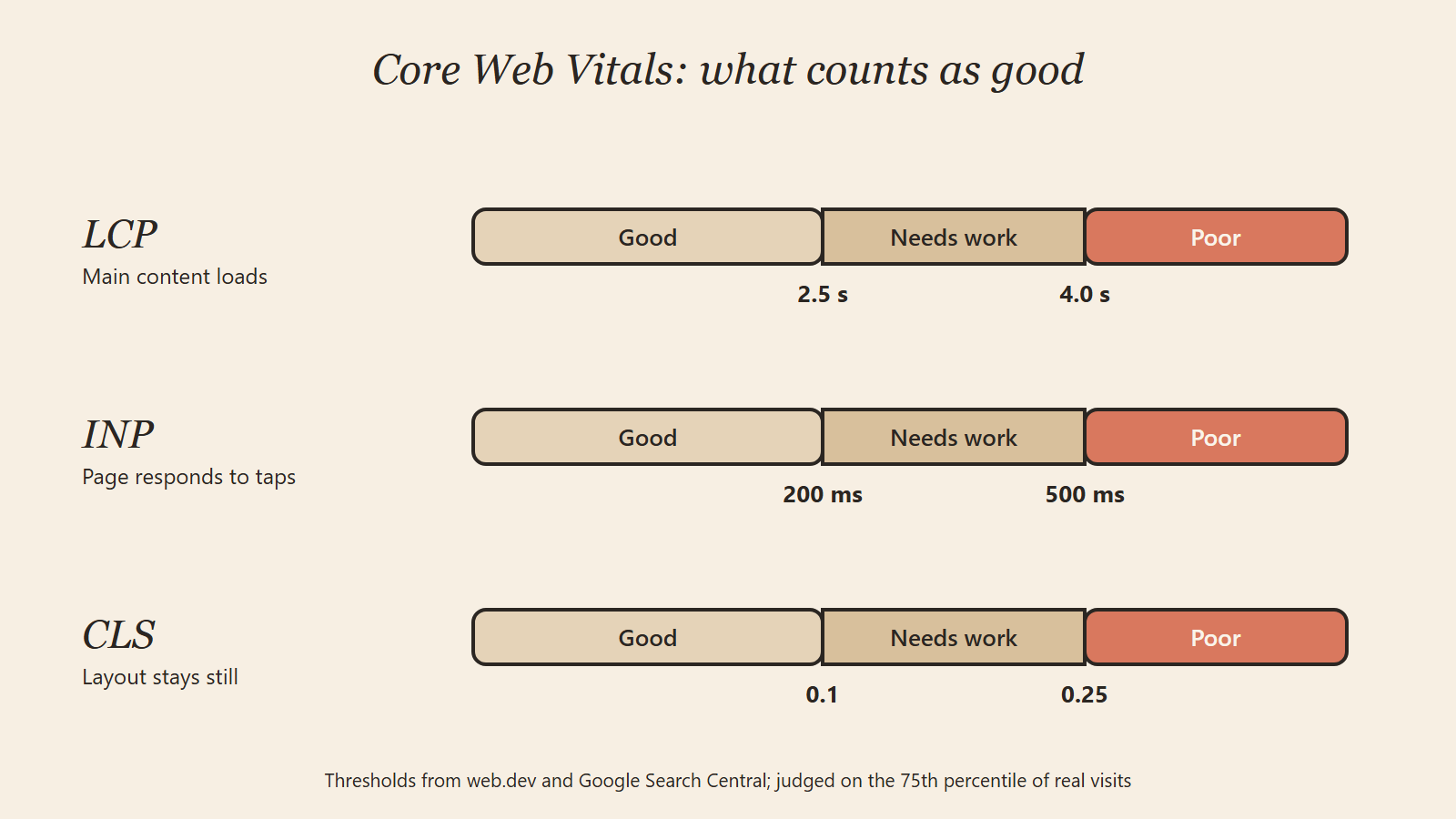
Each metric has three bands. These are the official cut-offs from web.dev's pages on LCP, INP and CLS:
| Metric | What it measures | Good | Needs improvement | Poor |
|---|---|---|---|---|
| LCP (Largest Contentful Paint) | How long until the main content appears | 2.5 s or less | Over 2.5 s up to 4.0 s | Over 4.0 s |
| INP (Interaction to Next Paint) | How fast the page responds to taps, clicks and typing | 200 ms or less | Over 200 ms up to 500 ms | Over 500 ms |
| CLS (Cumulative Layout Shift) | How much the layout jumps around unexpectedly | 0.1 or less | Over 0.1 up to 0.25 | Over 0.25 |
A page "passes" only when all three sit in the good band. Search Console labels a group of pages by its worst metric, so one weak score drags the whole group down.
What do LCP, INP and CLS mean in plain English?
Each metric maps to a moment your customer actually feels: waiting, tapping, and losing their place. Think of them as three questions a visitor asks without saying a word.
LCP: "Is anything happening?"
LCP times how long the biggest visible item takes to appear. On most small business sites that is the hero photo, a banner video's first frame, or the main headline block. If your homepage leads with a 4 MB photo of your storefront, that photo is probably your LCP, and it is probably slow on a phone.
INP: "Did my tap work?"
INP measures the delay between an action (tapping "Book now," opening a menu, typing in a quote form) and the screen visibly reacting. It replaced the older First Input Delay metric in 2024, according to web.dev. The difference matters: First Input Delay only judged the first tap, while INP watches every interaction across the whole visit. Heavy chat widgets, tracking scripts and page builders are the usual reasons a button feels "dead" for half a second.
CLS: "Why did that just move?"
CLS scores how much content shifts after it first appears. The classic case is reaching for the phone number and hitting an ad or a cookie banner that slid in above it. Web.dev lists images without set dimensions, late-loading ads and widgets, web fonts that resize text, and content inserted above what is already on screen as the common causes.
Do Core Web Vitals affect SEO rankings?
Yes, but modestly. Google's page experience documentation states that Core Web Vitals "are used by our ranking systems," and in the same breath says good results do not guarantee your pages will rank at the top.
The same page adds that Google "always seeks to show the most relevant content, even if the page experience is sub-par." In practice, that means a fast page with thin content will not beat a slower page that answers the question better. Speed acts more like a tiebreaker between pages that are otherwise close.
Three more details from Google's guidance are worth knowing:
- There is no single page experience signal. Core Web Vitals sit alongside other factors such as HTTPS and avoiding intrusive pop-ups.
- Scoring is mostly page by page. Google says its ranking systems generally evaluate pages individually, though some assessments are site-wide.
- Google still wants you to pass. Its Core Web Vitals page on Search Central says it highly recommends achieving good scores "for success with Search."
So the honest answer for Core Web Vitals SEO is this: fixing a poor score rarely rockets a page up the results on its own, but a poor score can quietly cost you the close calls. That is also why speed is one of the first things a proper SEO audit checks.
Why do Core Web Vitals matter for sales, not just Google?
Because the people who wait, mis-tap or lose their place are your paying customers, not a search algorithm. The ranking effect is small; the conversion effect is often larger.
The clearest public example is on Google's own web.dev. In its Vodafone case study, a 31% improvement in LCP on a sales page was followed by 8% more sales, a 15% higher lead-to-visit rate and an 11% higher cart-to-visit rate. Vodafone split traffic 50/50 between the faster page and the original, so speed was the main difference.
You are also not alone if your scores are weak. HTTP Archive's 2025 Web Almanac found that only 48% of mobile websites and 56% of desktop websites had good Core Web Vitals. On mobile, LCP was the hardest metric: 62% of sites passed it, compared with 77% for INP and 81% for CLS. If you fix only one thing, loading speed is usually it.
How do you check your Core Web Vitals?
Use two free Google tools: PageSpeed Insights for a single page, and the Core Web Vitals report in Search Console for your whole site. Both pull real-visitor data from the Chrome User Experience Report.
PageSpeed Insights: one page at a time
Paste a URL into PageSpeed Insights. The top section, "Discover what your real users are experiencing," is the part Google uses. Per Google's PageSpeed Insights documentation, it covers the previous 28 days of real Chrome visits. The 0 to 100 performance score further down comes from a Lighthouse lab test, which is useful for finding causes but is not your Core Web Vitals result.
| Field data (top of the report) | Lab data (the 0 to 100 score) | |
|---|---|---|
| Where it comes from | Real Chrome users over 28 days | One simulated visit on a test device |
| What Google uses for Search | This | Not this |
| Best used for | Knowing whether you pass | Finding what to fix |
| Changes after a fix | Gradually, over about 4 weeks | Immediately on re-test |
Search Console: the whole site
Open Search Console, then Experience, then Core Web Vitals. According to Google's help page for the report, it groups pages with a similar experience and labels each group by its worst metric. Mobile and desktop are listed separately, and mobile is usually where problems show up. If you have not set Search Console up yet, our DIY SEO guide walks through the basics.
Why your site may show "not enough data"
Smaller sites often see no field data at all. Google only reports real-user numbers when enough Chrome visitors have loaded the page, so PageSpeed Insights falls back to your whole domain, and if that is too thin, shows nothing. In that case, use the lab results as a guide and fix the obvious issues; Google cannot judge what it cannot measure, but your visitors still feel it.
What usually fixes poor Core Web Vitals?
Most small business sites fail for the same handful of reasons: oversized images, too many third-party scripts, and layouts that do not reserve space. The table below links each symptom to its likely cause and who normally handles it.
| What you notice | Metric hit | Likely cause | Typical fix | Who does it |
|---|---|---|---|---|
| Hero image or banner loads last | LCP | Huge image file, no compression, slow hosting | Compress and resize, serve modern formats (WebP or AVIF), load the hero first | Site owner with a plugin, or developer |
| Whole page blank for seconds on mobile | LCP | Slow server response, heavy theme or page builder | Better hosting or caching, a lighter theme, a CDN | Developer or host |
| Buttons and menus feel sluggish | INP | Too many scripts: chat widgets, trackers, pop-up tools | Remove unused apps, delay non-essential scripts until after load | Developer |
| Form typing lags | INP | Heavy form plugin or live validation scripts | Lighter form tool, simplify validation | Developer |
| Text jumps as the page loads | CLS | Images and embeds without set width and height | Add dimensions, reserve space for ads and embeds | Developer |
| Banner pushes content down | CLS | Cookie, promo or review banners injected at the top | Overlay banners instead of inserting them, or reserve space | Developer |
A pattern worth noting: many INP problems are self-inflicted by marketing tools. Every booking widget, heatmap and chat bubble adds code the phone has to run before it can respond. Audit what you actually use before paying anyone to "optimize" around it.
If your site needs more than tuning, for example a page builder that cannot be made fast, a rebuild may cost less over time than patching. Our AI website development team builds lean sites with these metrics checked before launch.
Which pages should you fix first, and when is it not worth it?
Fix the pages that earn you money first: the homepage, top service pages, booking or quote pages, and any landing page you pay to send traffic to. A slow blog post from 2019 matters far less than a slow "Request a quote" page.
Use this order of attack:
- Pages failing on mobile in Search Console that also bring in leads or sales.
- Fixes that help every page at once, such as image compression, caching and removing an unused script from the site template.
- Page-specific problems on lower-traffic pages, only after the first two are done.
It is not worth chasing a perfect 100 lab score once your field data is green across all three metrics. Past "good," extra speed work usually returns less than spending the same budget on better content, reviews or local listings (our local SEO checklist covers those).
Questions to ask your developer
- Which metric is failing, on mobile or desktop, and on which page groups?
- What is the specific cause, and will the fix help the whole site or one page?
- Will you show me the before and after field data, not just the lab score?
- Will removing any script break tracking or a tool we rely on?
After a fix ships, click "Validate fix" in the Search Console report. Google's help page says validation runs for 28 days, so expect about a month before the warning clears.
Frequently Asked Questions
What is Core Web Vitals in simple terms?
Core Web Vitals are three Google scores for how a page feels to real visitors: how fast it loads (LCP), how quickly it reacts to taps (INP), and how stable the layout stays (CLS). Passing means hitting the good band on all three for at least 75% of visits.
Did INP replace First Input Delay?
Yes. Interaction to Next Paint became a stable Core Web Vital in 2024 and First Input Delay was retired. INP is stricter because it measures every interaction during a visit, not just the first one.
Is a PageSpeed Insights score of 100 required to rank?
No. The 0 to 100 number is a lab test score, and Google's Search systems use the real-user field data instead. Aim for good field results on LCP, INP and CLS, then put the remaining effort into content and relevance.
Are Core Web Vitals measured on mobile or desktop?
Both, separately. Google reports mobile and desktop results on their own, and mobile is where most sites fail, so check the mobile tab first in PageSpeed Insights and Search Console.
How long does it take for Google to see my fixes?
About four weeks. Field data is a rolling 28-day window, and Search Console's validation also runs for 28 days, so improvements show gradually rather than overnight.
Can a slow site still rank well?
Yes, if its content is clearly the most relevant answer. Google says it shows the most relevant content even when page experience is poor, but in close competition a faster, more stable page has the edge.
Get a free check of your Core Web Vitals
If you are not sure whether speed is costing you rankings or leads, start with a free AI SEO audit. We will pull your real-user Core Web Vitals, flag the pages that matter for revenue, and tell you which fixes are worth doing and which are not, alongside how you show up in Google and AI search. You can see what the wider work looks like on our AI SEO services page.
To request it, WhatsApp our team, email info@speedxmarketing.com, or use our contact page. We will reply with a plain-English summary and a fixed scope if you want help. SpeedX Marketing.